Building Voice AI Agents on Android with Agora
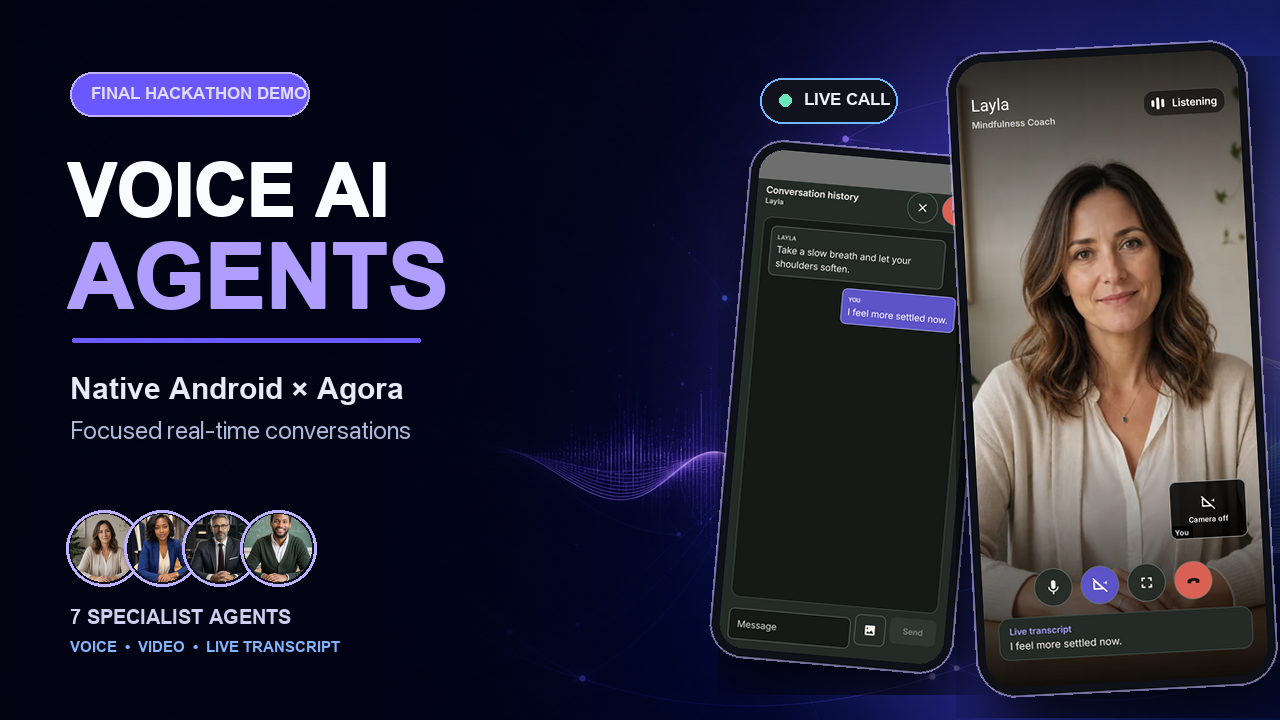
I built Voice AI Agents for the Android Engineers × Agora Conversational AI Hackathon. It is a native Android app for short, focused voice and video calls with seven specialist AI agents.
My goal was simple: talking to an AI agent should feel like placing a call, not configuring a meeting room or opening another chatbot. You choose the person who can help, start a five-minute conversation, speak naturally, and leave with a summary or transcript you can share.
The complete source code is available in the Android Agora Hackathon repository.
Final hackathon demo
What I built
The app has seven agents, each designed for a specific kind of conversation:
- Layla is a Mindfulness Coach for breathing, grounding, and calmer pacing.
- Ari is an AI Tutor who gives patient explanations and guided practice.
- Tara is an Astro Guide for Kundali and personal-question exploration.
- Mathew is an Interview Coach for preparation and candid answer practice.
- Mia is a Shopping Assistant for visual comparison and practical style guidance.
- Aditi is a Nutrition Coach for general food education and everyday choices.
- Sofia is a Language Teacher for speaking practice, correction, and roleplay.
Each agent has a public profile, portrait, role, and conversation description. Private prompts, voices, provider settings, and credentials stay on the backend.
Why I designed it as a call
Many voice AI demos still feel like chat pages with a microphone added. The user sees provider controls, room settings, or unclear connection states before the conversation even begins.
I wanted the flow to feel more familiar:
- Sign in with Google.
- Choose an agent.
- Read what the agent can help with.
- Start the conversation.
- Talk, share camera or image context, and follow the live transcript.
- End the call and export the transcript if needed.
Microphone, camera, RTC, RTM, and the AI agent only start after the user explicitly starts the call. Session preparation happens first, without requesting media permissions in the background.
How the realtime path works
The Android app is an untrusted client. It renders the interface, manages user-approved local media, and connects to Agora with short-lived session material returned by a trusted Node.js backend.
Native Android app
  Jetpack Compose UI
        |
        v
  ViewModels and use cases
        |
        +---- trusted Node.js backend
        |       - verifies Google identity
        |       - creates short-lived tokens
        |       - owns agent configuration
        |       - starts and stops the AI agent
        |
        +---- Agora RTC
        |       - realtime audio and video
        |
        +---- Agora RTM
                - transcripts, messages, receipts,
                  and agent-state events
Agora RTC carries audio and video. RTM carries the live transcript, text and image messages, delivery receipts, and agent state. Agora Conversational AI connects speech recognition, the language model, text-to-speech, and optional avatar providers on the server-owned side of the session.
One session-scoped conversation runtime owns RTC, RTM, local media, agent presence, timers, transcript state, and cleanup. Compose screens receive immutable state and send user actions; they do not call Agora or backend APIs directly.
The security boundary
I treated the APK as public from the beginning. It contains only ordinary client configuration such as the backend URL, Google server client ID, and Agora App ID.
The backend keeps the sensitive parts:
- Agora App Certificate and customer credentials
- OpenAI, Deepgram, ElevenLabs, Anam, and LemonSlice keys
- private agent prompts and voice configuration
- token signing and agent lifecycle operations
- long-lived or reusable session material
Google ID tokens and mobile bearer tokens remain in process memory. Conversation text, images, and transcripts are not persisted by default. Transcript export is a user action and uses the Android Sharesheet instead of silently uploading the conversation elsewhere.
Making the experience feel native
The realtime SDKs were only one part of the work. A call also has to survive normal Android behavior.
The app includes:
- Google sign-in through Android Credential Manager
- an edge-to-edge Jetpack Compose interface
- a foreground call service and ongoing
CallStylenotification - Picture-in-Picture during active visual conversations
- audio-focus handling when another app or phone call competes for sound
- speaker, earpiece, Bluetooth, and wired-headset routing preferences
- camera switching with a mirrored front preview
- a draggable and resizable self-view
- a transcript bottom sheet with text and image input
- keep-screen-on behavior and lifecycle-safe cleanup
Camera permission is optional. If it is denied, the conversation continues as audio-only and the interface keeps the camera visibly off.
Knowing when a call is actually live
One detail caused more thought than I expected: a successful backend response does not mean the conversation is ready.
The app marks a call as live only after it observes the expected agent or avatar in the Agora channel. That is also when the five-minute timer begins. Starting the timer earlier would waste conversation time while the agent is still connecting and could leave the UI showing a live state when no agent is present.
The runtime listens for connection, agent, transcript, media, and delivery events, then converts them into project-owned models before the UI sees them. This keeps SDK callback shapes out of the Compose layer and makes state changes much easier to test.
Ending cleanly matters as much as joining
A voice call touches the microphone, camera, audio routing, services, notifications, RTC, RTM, timers, and a remote AI agent. Any one of those can be partially initialized when something fails.
I built teardown as one repeatable operation. Whether the user taps End Call, the timer expires, Android recreates the activity, or the session fails, cleanup attempts to:
- stop new media and message operations;
- stop the remote agent through the backend;
- unpublish and release local media;
- leave RTC;
- unsubscribe and log out of RTM;
- remove listeners and cancel session jobs; and
- clear tokens, attachments, timers, and prepared state.
Each step tolerates resources that were never created or were already released. This prevents duplicate runtimes, orphaned agents, and stale sessions after navigation or activity recreation.
Technology stack
- Kotlin with Gradle Kotlin DSL and JVM 17
- Jetpack Compose, Material 3, and Compose Navigation
- Agora RTC Android SDK 4.3.2
- Agora RTM Android SDK 2.2.4
- AndroidX Credential Manager for Google authentication
- OkHttp and Kotlinx Serialization for backend communication
- DataStore for local preferences
- Coil for image loading and local image preparation
The project also has JVM tests, instrumented Compose tests, screenshot validation, Android lint, and debug/release build checks.
What I learned
The biggest lesson was that the quality of a voice AI app depends on everything around the model. Connection state, interruption, permissions, background behavior, cleanup, and clear feedback decide whether a conversation feels dependable.
Separating session preparation from realtime startup made the permission flow easier to understand. Waiting for actual agent presence made the timer honest. Keeping privileged configuration on the backend let the Android client stay replaceable and safe to distribute.
Five minutes is intentionally short. The app is built for one useful conversation with one specialist, followed by a clean ending and something the user can take away.